One calm place for your habits, your journal and your notes. Your life branches out from one point, you, to the right. Miss a day and a leaf you've earned saves it; sick or traveling, your streak waits.
made by just me, for my family and friends · Hasan
Welcome backNothing to catch up on. What changed since your last visit is under What's new.
Missing a day won't break your streakDo it 7 days in a row and you earn a leaf; it saves a missed day.
Sick or away? Your streak waitsRest days are unlimited and cost no leaf.
Works offline, no accountYour data stays on your phone. No ads.
Reminders at your timeNo guilt words. Or none at all.
How it works
Your life isn't a list, it's a vine
Three ideas: everything branches out from you to the right; missing a day doesn't break your streak; your day lives in one place. You can touch everything below.
Everything branches out from you, to the right
In a flat list, a work deadline sits right next to "buy milk". In Vyne you're in the middle; everything that matters opens a column to the right, and branches open columns of their own.
A flat list
Build your own vine
Tap one or type your own. Up to six branches; each grows two small twigs.
Leaves are earned. Rest is free.
A small simulator running the app's own rules. Pick a mode, then tap the days.
You earn a leaf after 7 days in a row, you can hold at most 2, and a leaf only saves the day before. Rest, sick and travel days are unlimited: your streak waits and no leaf is spent.
0
donekept by a leafrest (streak waits)streak broke here
Down to day 100
Scroll down inside the well: the first hundred days of a habit, by the app's rules.
Day 1
A sample day, seven stops
A sample day instead of a feature list. At each stop, a small snag in the day, then how the app answers it.
07:30
Features
Every piece, and how to use it
Three big branches, just like the app. Every card has a "How to use it" underneath. Pieces marked new arrived with 1.5 in October.
The map
The shape of your life
A new first run
I open a new app and don't know where to begin.
How to use it
On first launch a single vine grows: your name, your first branch.
Six buds open one by one: Notes, Journal, Reminders, People, Thought cloud, Stats.
Pick a daily check-in time if you like; then your first leaf.
Branches and the path
My life doesn't fit in a flat list.
How to use it
Grow a branch from your profile: Work, Health, Home…
Each branch opens its own column to the right; "+ Add" makes a sub-branch.
The path at the top always shows where you are; tap any step to jump back.
The Today cardnew
When I open the app, I want to see what today holds at a glance.
How to use it
It sits above your vine: your next event, today's habits and your journal.
On the clock? Your hours today show up too. Just counts, never "missed".
Fold it to one line or close it; bring it back in More › Home.
Branch page
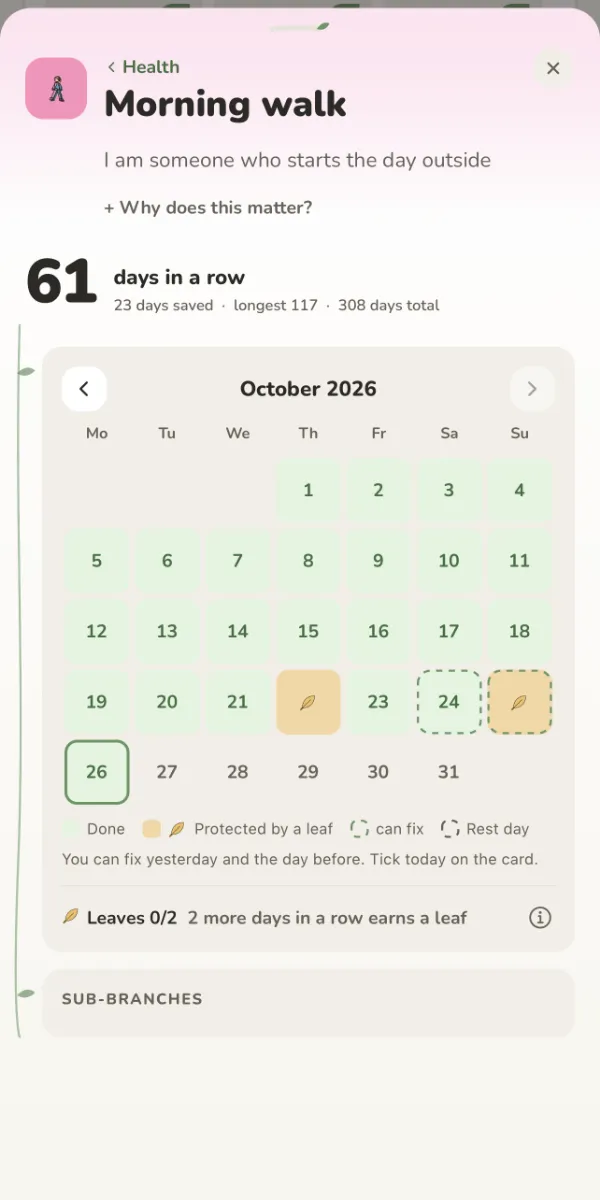
I want a habit's whole story in one place.
How to use it
Tap a card and its page opens.
A big streak: days in a row, longest, total.
Fix yesterday and the day before in the calendar; sub-branches, a note and money live here too.
10 min walk after evening tea · the armchair
every day 9:00 pm
Habits, cues and times
I mean to do it, then forget when.
How to use it
Turn a branch into a habit; today's sit at the top.
Write a "when / where" cue: "After evening tea · the living-room chair".
Give that habit its own reminder time, if you like.
It doesn't have to be daily: pick "3 days a week" and leaves are earned by the week.
7 days in a row, one leaf hold 2 at most
Leaves
Miss one day and the whole streak is gone.
How to use it
Do it 7 days in a row and you earn a leaf; you can hold up to 2.
Miss a day and a leaf saves it: "A Leaf Fell".
A leaf only saves the day before; two empty days in a row break the streak.
your streak waits: it doesn't grow, it doesn't break
Rest days
I'm sick, or away; I don't want my streak to break.
How to use it
Tap the day: "or take a break today".
Pick Rest, Sick or Travel. As many as you need.
Your streak waits: it doesn't grow, it doesn't break. No leaf is spent.
The year in leavesnew
A whole year went by and I can't remember what I did.
How to use it
Open the year in Stats: one leaf a day, a single vine from January to today.
Tap a branch to hide it from the page, on this phone only.
Underneath: the year in numbers, and one sentence of your own about it.
Welcome backNothing to catch up on. Pick one for today.
Welcome back
I haven't opened it for days; everything will be red now.
How to use it
After 3 or more days away, a gentle card appears.
"Nothing to catch up on. Pick one for today."
One tap shows what you missed, or just close it.
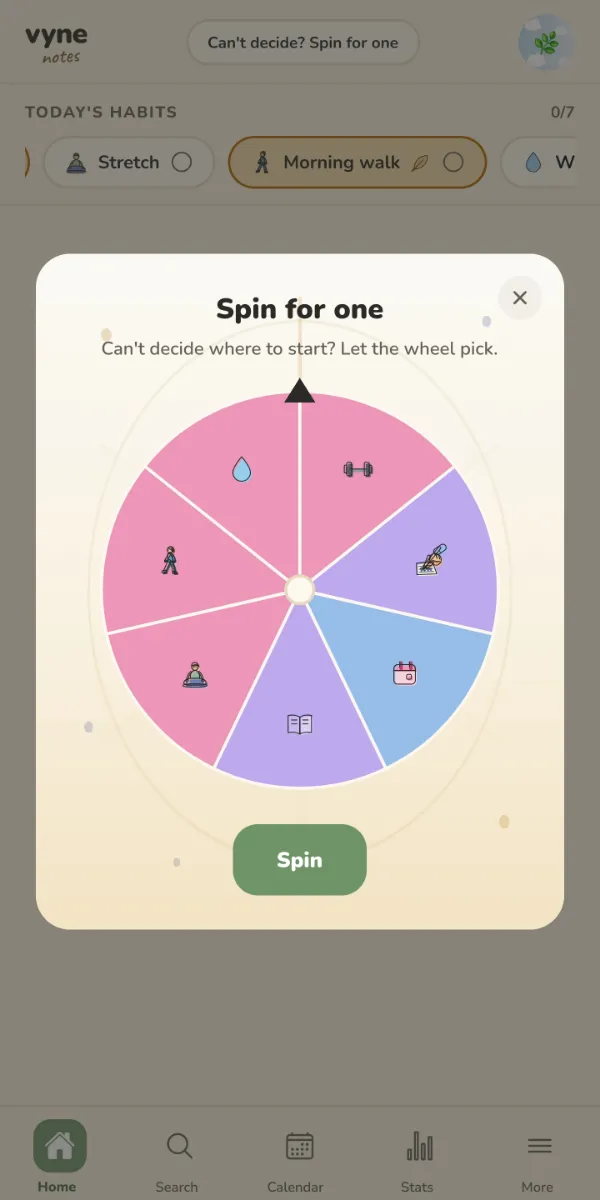
The wheel
I can't decide, so I start nothing.
How to use it
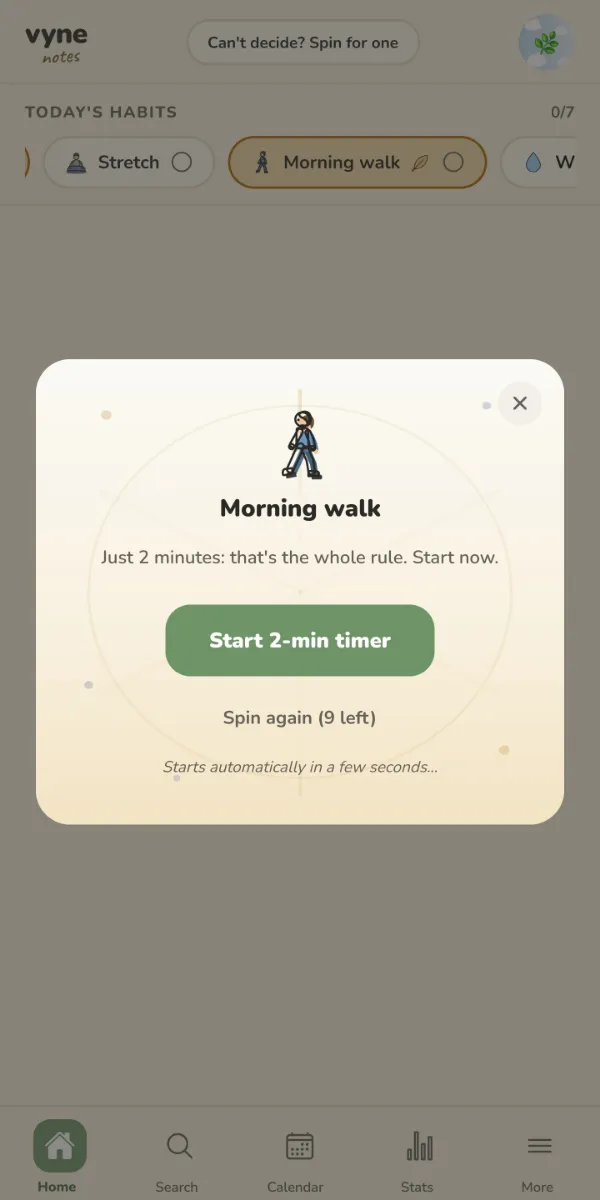
Spin the wheel and let it pick a habit.
Just 2 minutes: start the timer.
Don't like the pick? You get a few re-spins.
Templates
A big change is coming and I don't know where to start.
How to use it
Nine one-tap starts: Exam Period, Moving House, New Job and more.
Pick the date; branches and steps come ready.
Try one right now in "Try a template" below.
Statsnew
Am I actually getting anywhere?
How to use it
Pick a week, a month or a year.
One plain sentence on top: "About the same as your usual."
A "What stood out" card: your fullest day, your longest run.
Numbers on the bars, axes on the charts. Gray means nothing happened. Nothing more.
Exam Period is over⋯ → Archive
Archive
Finished things crowd the vine.
How to use it
On a finished branch: ⋯ → Archive.
It leaves the vine; your stats stay the same.
Always findable under "Archived" in Search.
Special habits
Habits with a page of their own
Pick one from the templates when you add a branch; each comes with its own page. All optional.
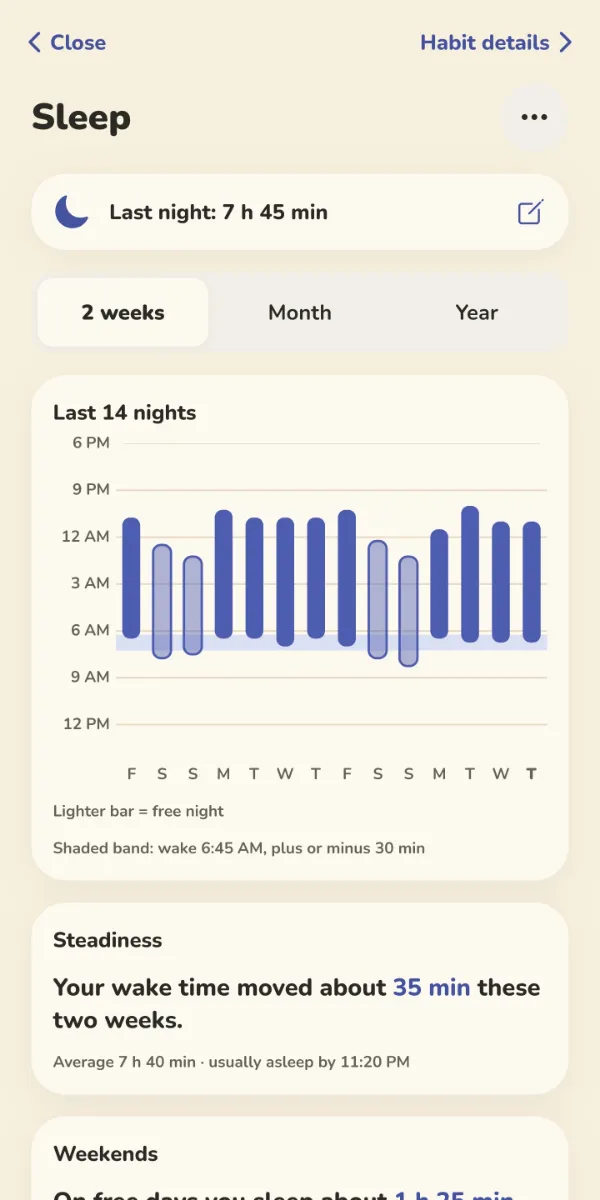
Sleepnew
I never remember when I went to bed or when I got up.
How to use it
In the morning, enter when you went to bed and woke up, and how the night was. The rest is optional.
The last 14 nights as bars; free nights with no alarm are lighter.
A "Steadiness" card tells you how much your wake time moved. Patterns are patterns, not proof.
Readingnew
I can't remember which book I finished when.
How to use it
Tick the day with "Read today"; add the minutes if you like.
Put your books on shelves: Now reading, Want to read, Finished, Stopped. Give a finished one stars and a line that stayed with you.
When you search for a book, only the words you type go to a free book catalog; nothing else leaves your phone. A weekly goal is optional: a number to look at, not a score.
Water trackingnew
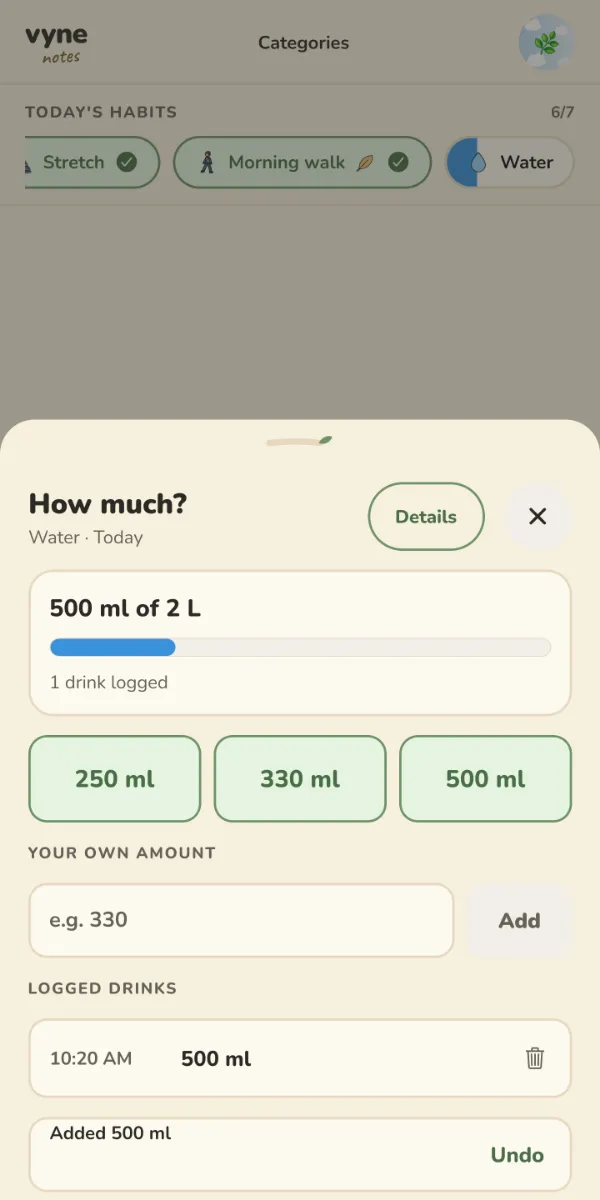
I never know how much water I've had today.
How to use it
Add a water habit; the goal starts around 2 L, change it any time.
A glass, a bottle: your own portions become quick buttons.
Half your goal makes the day count. Added by mistake? Undo.
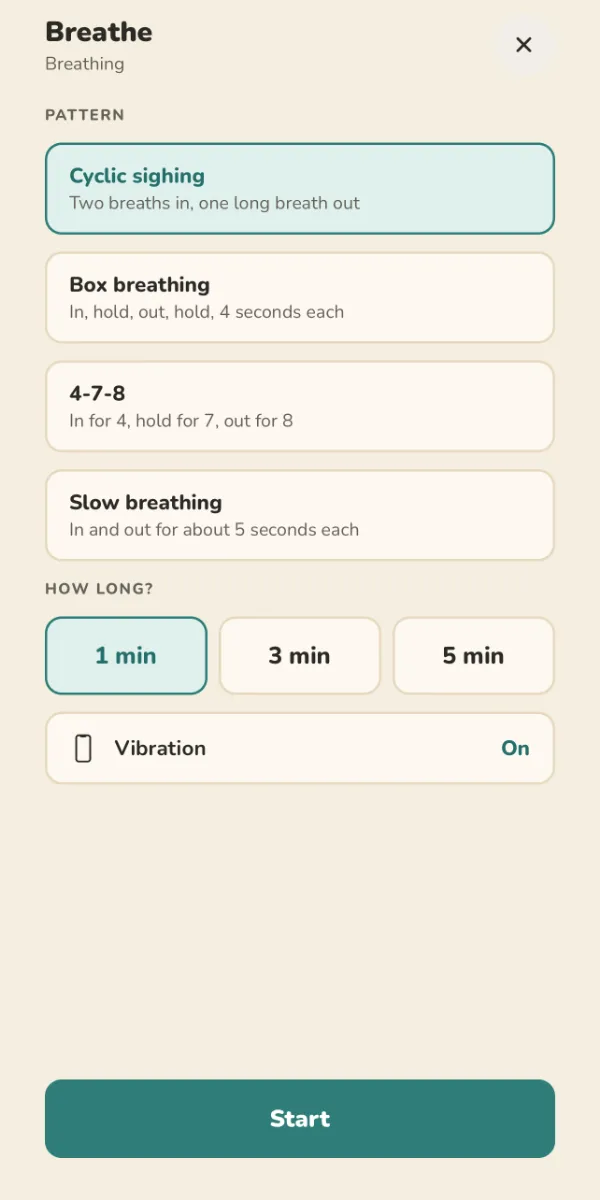
Breathenew
When I'm tense, I don't know how to calm down.
How to use it
Pick a pattern: cyclic sighing, box breathing, 4-7-8 or slow breathing.
1, 3 or 5 minutes; with vibration if you like, eyes off the screen.
The minutes go on that day. Breathing stays private, it never goes into a shared profile.
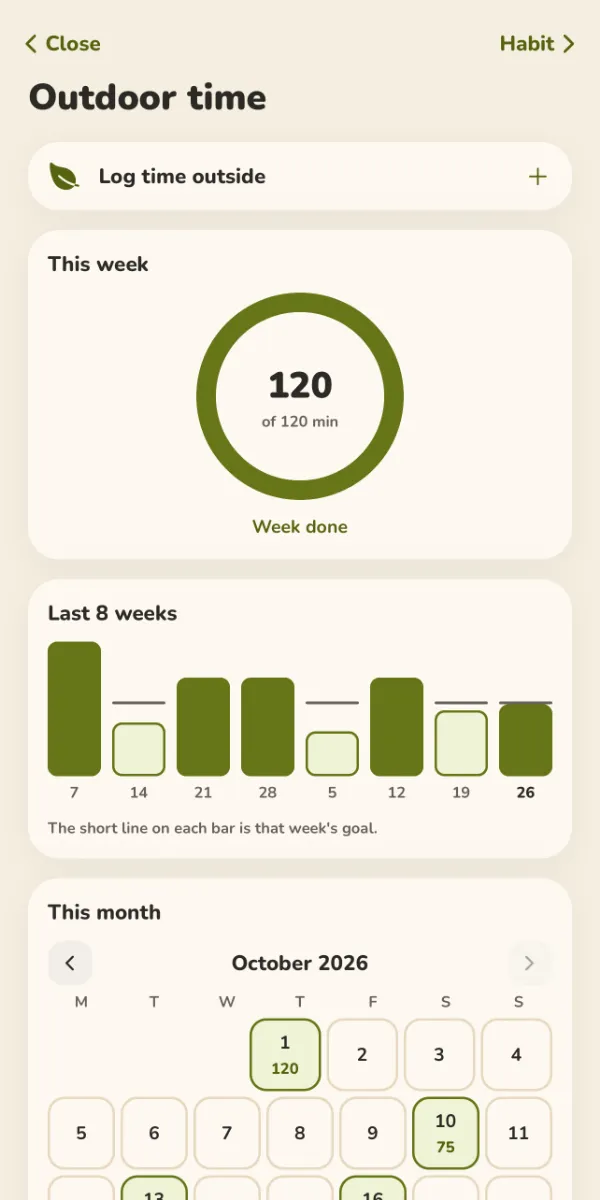
Time outsidenew
I only notice in the evening that I stayed inside all day.
How to use it
Log your minutes outside; the goal is weekly, not daily.
When the ring fills: "Week done". See the last 8 weeks at a glance.
Outside before 10:00? Mark it as "morning light"; it may help your sleep.
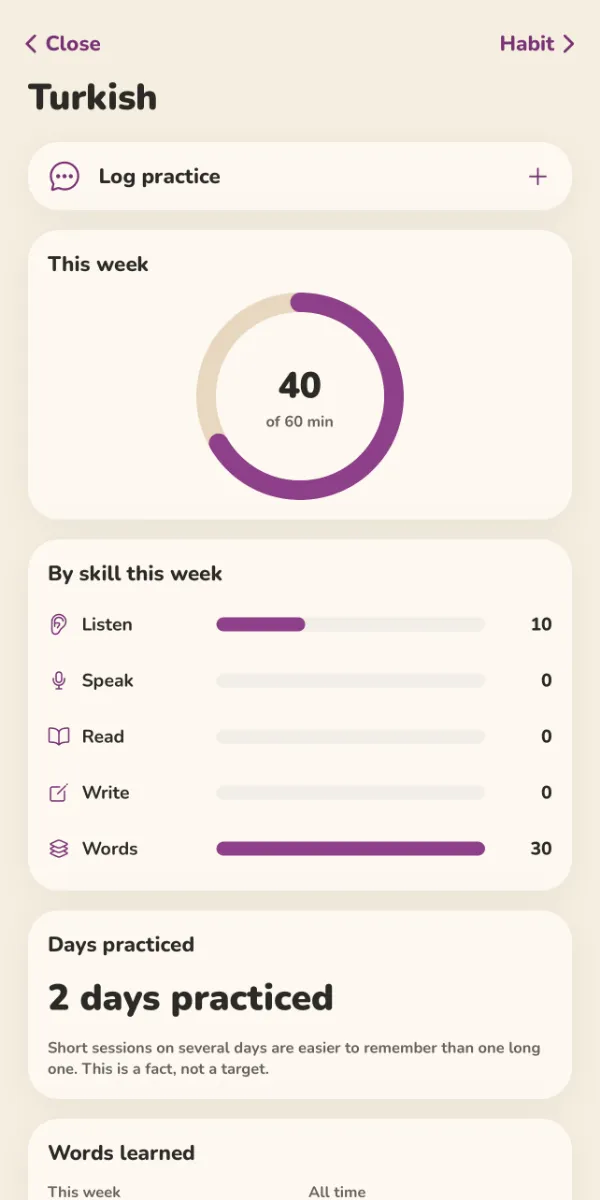
Language practicenew
I'm learning a language but I have no idea how much I practice.
How to use it
One habit per language; log the minutes and what you practiced: listening, speaking, reading, writing, words.
A weekly ring and "by skill this week" bars.
Count the words you learned, if you like. Short, frequent sessions stick better; that's a fact, not a target.
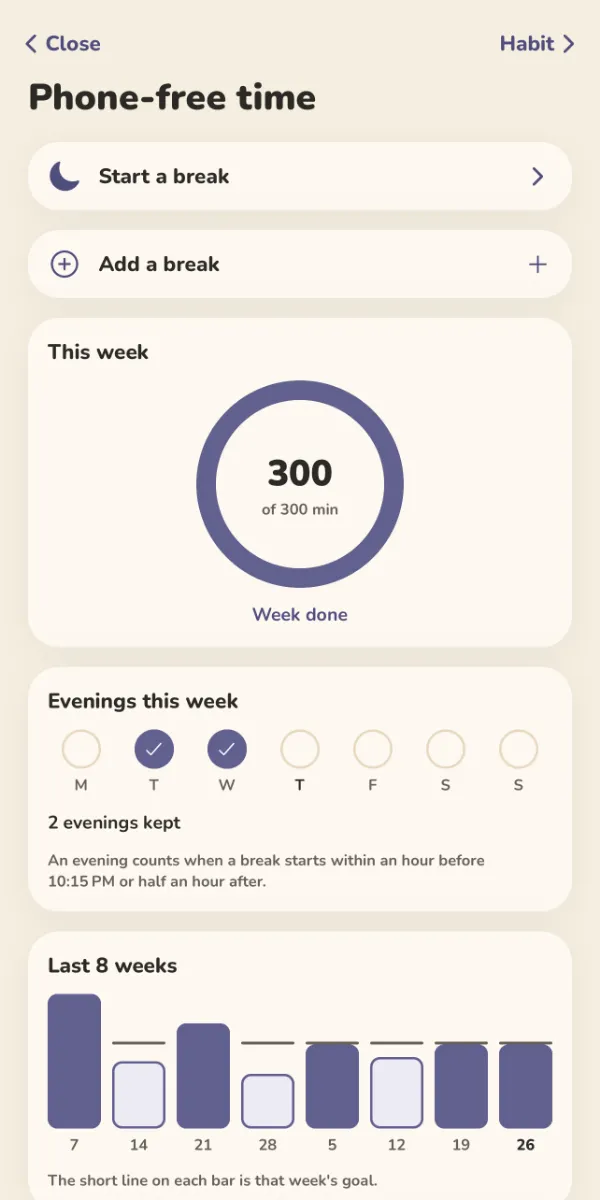
Phone-free timenew
In the evenings I can't put my phone down.
How to use it
Tap "Start a break" and put the phone down. The screen stays calm: "Your phone can rest. Come back whenever you like."
End the break when you pick it up again; the minutes add up for the week.
Pick an evening time if you like: a break that starts close to it keeps that evening.
Plant carenew
I forget which plant I watered when.
How to use it
Add your plants; each gets its own watering and feeding rhythm.
Vyne only speaks up on the days a plant needs care.
"Water", "Feed" or "Not yet"; not yet means it tells you which day to look again. It's not a habit: no streak.
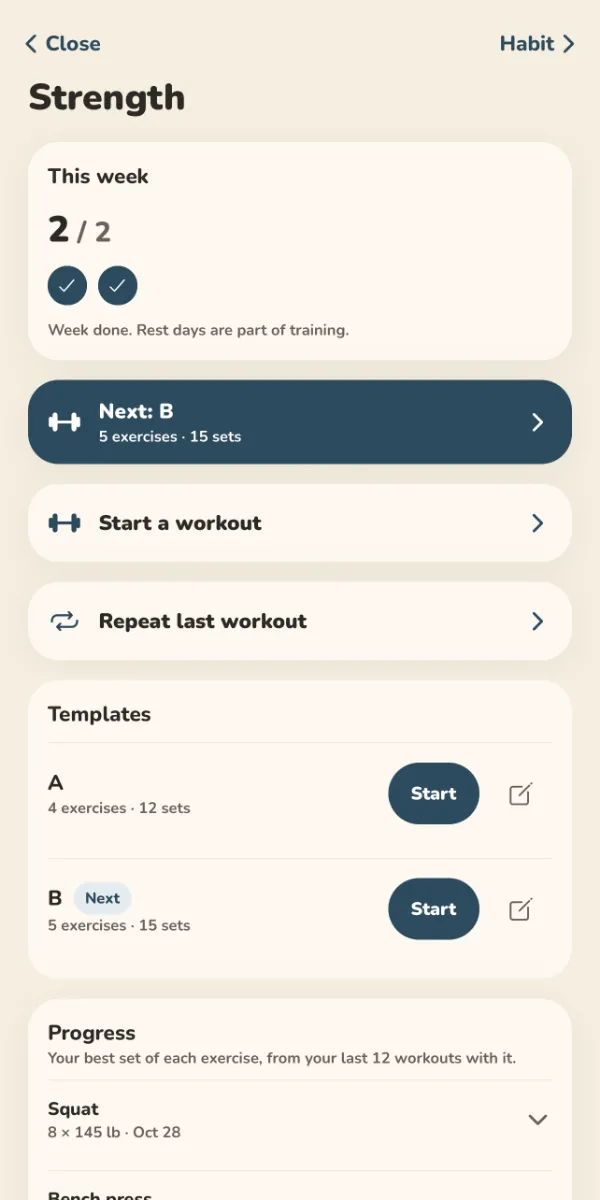
Strengthnew
I can't remember what weight and how many reps I did last time.
How to use it
Start a workout, add exercises and sets; "Repeat last workout" is one tap.
Two templates (A and B) take turns; a quiet rest timer between sets.
The weekly goal counts workout days. "Week done. Rest days are part of training."
Calendar and hours
Your days and your hours
Calendarnew
My appointments live in one app, my habits in another.
How to use it
The Calendar tab at the bottom: Schedule, Day, 3 Days, Week, Month and Year.
Events, due dates, reminders, birthdays and holidays together. Tap a day in Month and its list opens.
In Year, every past day is shaded by how full it was. It can show your phone's calendars too; those are read on the phone.
Time Clocknew
I can never work out how many hours I put in this week.
How to use it
In Notes: "+ Add" › Time Clock.
Slide to clock in, clock out when you're done. Forgot? Fix the times later.
The week's card takes breaks off; add an hourly rate and overtime to see an estimate. Only an estimate: your paycheck is the record.
Today 2 of 4Running · Reading
On the clock5h 40m
iPhone and Android
Widgets and Sirinew
I don't want to open the app just to tick something off.
How to use it
Add a Vyne widget to your phone's home screen.
See today's habits and your Time Clock right there.
On iPhone, Siri or the Shortcuts app can tick a habit or clock you in and out without opening Vyne.
Notebooks
Everything on your mind
Thought cloud
A thought flies away before it finds its place.
How to use it
A little cloud rises next to your profile bubble.
Tap, write: it lands in your Inbox.
Later, "Send to…" the right folder. Don't want it? Hide the cloud.
vyne notes
vyne / notes
How do I get to my notes again?
How to use it
"notes" is penciled under the logo.
One tap opens Notes.
In Notes, tap the logo to go back to your vine.
Notes and folders
My notes are scattered everywhere.
How to use it
Unlimited folders; put notes, lists or reminders inside.
Folders open and close like bubbles.
Pick one of five papers as you add it.
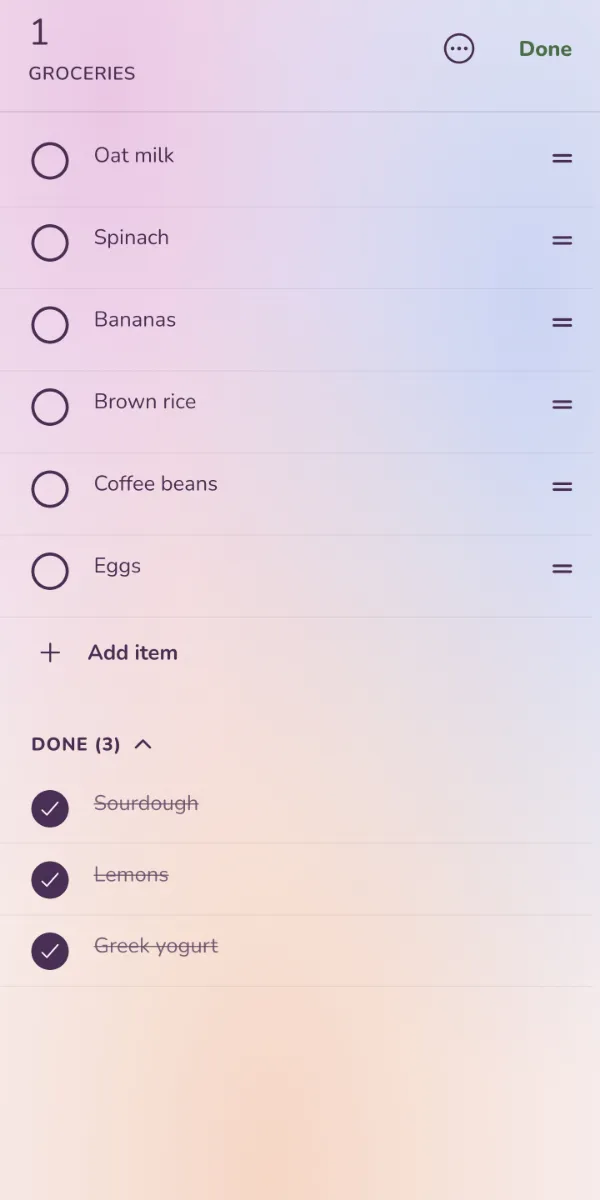
Page 1Page 2
Milk
Eggs
Tomatoes
Lists
My grocery list gets too long to follow.
How to use it
Split a list into named pages.
Tick items, move them between pages.
Deleted by mistake? Undo.
Pay renttomorrow 9:00 am · monthly
Snooze 15 minTomorrow
Reminders
Rent, bills, appointments: always the last minute.
How to use it
Pick a date, a time and a repeat.
Get an early heads-up if you want one.
When it rings: "Snooze 15 min" or "Tomorrow".
Journal
I want to journal, but the blank page scares me.
How to use it
One page a day; if you don't know what to write, it offers a question.
On Mondays, three more questions about the week.
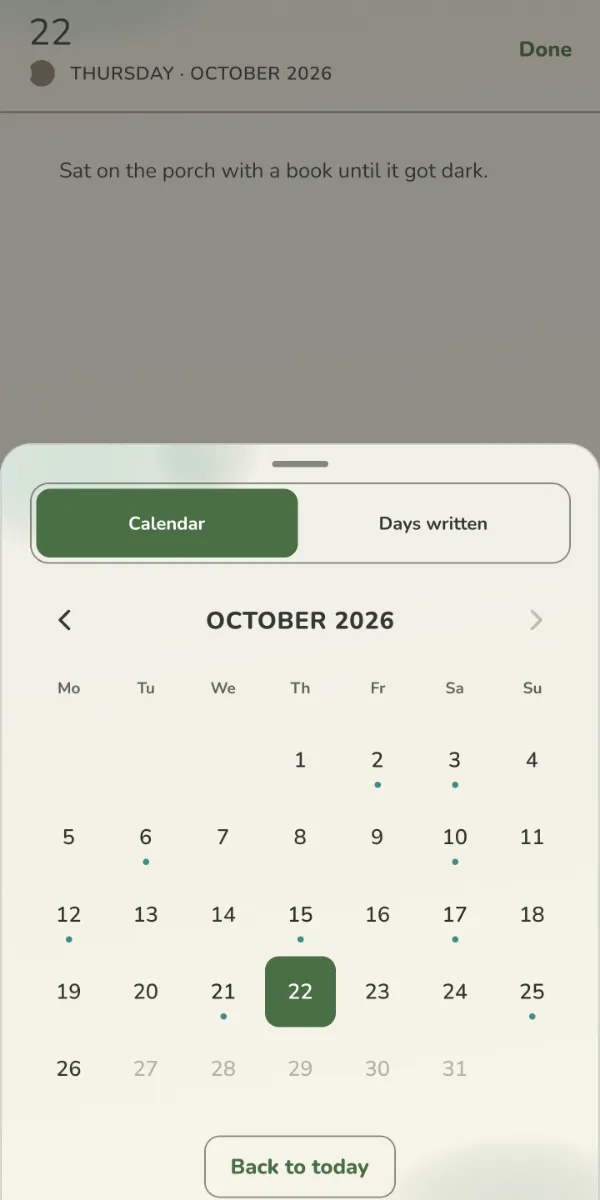
"A year ago today" and a calendar of past days.
Monwalked in the rainTuecalled momWedearly nightThuslides done!Fripizza nightSatthe marketSunnothing, it was nice
Weekly diary
I don't have time to write much.
How to use it
A whole week on one page.
One line a day is enough.
Look back through the list of weeks.
People
I forget birthdays, and what the people I love told me.
How to use it
Add a person and their birthday.
Get a heads-up before the birthday, if you like.
Jot short notes: "What did they say?"
Yours
How it looks, and your data
Cotton · Matcha · Bloom · Space · GalaxyLight · Warm · Dark · Midnight
Themes and papers
I want it easy on the eyes, and to feel like mine.
How to use it
Four themes: Light, Warm, Dark, Midnight.
Five papers: Bloom, Matcha, Cotton, Space, Galaxy.
The "Look" button at the top of this site does the same.
Drawn for Vyne
Emoji look different on every phone.
How to use it
Every icon and character in the app was drawn just for Vyne, in four styles by size. The drawings on this site are the same ones.
36 characters for your profile, or your own emoji.
Your saved emoji never change, only how they look.
Search everything
Where did I write that down?
How to use it
Search finds branches, notes, lists, journal days and people.
It ignores accents: "cafe" finds "café".
Tap a result and it opens right there.
VyneThree branches for today. No rush.
at the time you pick
Kind notifications
Apps keep making me feel guilty.
How to use it
The daily check-in is one calm sentence, at the time you pick.
Words like "you'll lose your streak" are banned, and a test guards it.
Habits and reminders only ring at the times you give them. Or never, if you'd rather.
AddReplaceUndo the last 3
Backup, moving and import
Will I lose everything when I change phones?
How to use it
Your data stays on your device; export to a file if you like.
Importing never duplicates: "Add" or "Replace", and the last 3 imports can be undone.
"Add what's missing" brings deleted items back; your cloud backup status fits in one line.
Shared profilesnew
I want to keep track of the house with someone else.
How to use it
Share one profile with one other person: you send a code or a link that works for 24 hours.
You both see and edit it; inside a day you can see who checked what. Your other profiles stay private.
Removed things are kept for 30 days. If you leave, you can keep a private copy.
Sign-inCloud backupEncryption
end-to-end encryption: optional
Your account pagenew
I keep hunting for backup and sign-in in the settings.
How to use it
No account needed; for cloud backup, go to More › Account.
Sign-in, backup and encryption now live on one page.
Turn on end-to-end encryption and your backup is locked with a key that lives only on your devices. It's optional.
Branchopens to the right of you
Habita branch that repeats
Leafsaves a missed day
How Vyne worksnew
Wait, what was a "leaf" again?
How to use it
More › How Vyne works.
Branches, habits, leaves, notes, calendar, stats and backup: a short paragraph each, and a button that takes you there.
This site's "How it works" section tells the same story.
The app itself
Real screens, from a made-up demo profile
When you can't decide, the wheel picksJust 2 minutesA habit's own pageWater: how much?Sleep: the last 14 nightsTime outside: week doneLanguage practice, by skillBreathe: pick a patternPhone-free eveningsStrength: the next workoutA list on Bloom paperA note, two pagesThe journal and its calendar
Try a template
All nine templates from the app, with every branch inside. Pick one and change the date: tap "Create" in the app and exactly these join your vine.
Five papers, five pages
Each page is a real paper from the app. Swipe the page or use the arrows.
1
Why I made it
→
My life has always had a lot of different branches. Whenever I forgot about some of them, it felt like I was falling behind.
I wanted to see everything in one big picture. That's where the branching vine came from.
— everything, in the big picture
2
Everything is a branch, to the right
You're in the middle. Everything that matters opens a column to the right, and branches open columns of their own. The path at the top always tells you where you are.
you › work › report
3
You got sick. Your streak waits.
In thirty days you forgot one: a leaf you'd earned saved it. You were also sick for two days: you marked them "Sick", and the streak neither grew nor broke.
leaves are earned, rest is free
4
Folders open like bubbles
Home
School
Recipes
Groceries
Ideas
Vacation
Tap "notes" under the logo and Notes opens. Tap a folder and its contents come out of that bubble; go back and they fold into it again.
vyne / notes
5
Night, and one question
The journal is one page a day. If you don't know what to write, it offers a question: "What went well today, and why?" On Mondays three more come, to look back at the week.
Galaxy paper is always night. So is this page.
good night
1 / 5 · Cotton
Who makes it
There's a letter on the desk
Each note on the desk is a problem and its fix. On a computer you can move the notes around.
Hi,
I'm Hasan, and Vyne is made by just me, not a company, for my family and friends. The apps I tried were either full of annoying ads or scattered my life across ten different places. I wanted to see everything in one big picture.
Some days there was a lot to do and I didn't feel like doing any of it; that's what the wheel is for. I use Vyne every day, mostly for habits.
No ads, no account needed. If something feels off, write to me. I read every message.
— Hasan
homeundecided daysbranch pageno ads · no account
problemA thought flies away before you find the right place for it.
fixThe cloud next to your profile bubble: tap, write, it lands in your Inbox.
problemYou got sick, lost the streak, and gave up.
fix Mark that day "Sick". Your streak waits: it doesn't grow, it doesn't break.
you can move the notes
Why is it like this?
Choices I made while building the app, and why. Some are still sprouts, some are trees by now.
tree
Why day 66?
Not a random number. In Phillippa Lally's study at UCL, the median time for a behavior to become automatic was 66 days. It varies a lot from person to person, so 66 is a threshold, not a finish line.
— H.tree
Why are leaves earned?
The goal isn't never missing, it's never missing twice in a row. But if leaves were free, a streak would mean nothing. First the habit becomes a habit, then it protects you.
— H.bud
Why are rest days unlimited?
You don't choose to get sick or to travel. Counting those as missed days would punish you. Your streak waits: it doesn't grow, it doesn't break.
— H.tree
Why do reminders come at your time?
The point isn't to hook you on the app, it's to add something to your life. A flood of notifications grabs attention but eats trust. So Vyne only speaks up at the times you pick, and never with guilt words.
— H.tree
Why are the celebrations a surprise?
Something happens on day 7, 30, 66 and 100. I won't show it here: seeing it early would spoil it.
— H.bud
Why is the vine empty after setup?
I tried starting with a ready-made template, but it never felt real: everyone's life is different. An empty vine is yours; templates are one tap away when you want them.
— H.tree
Why no account?
A habit app doesn't need your email. Everything runs on your phone. An account is only for backup or sharing, if you want them.
— H.sprout
Is cloud backup encrypted?
Cloud backup is optional. If you turn it on, it's encrypted in transit and at rest and protected by access rules, but that isn't end-to-end encryption. For more, turn on end-to-end encryption: your whole backup is then encrypted on your phone with a key only your devices hold. It's off until you turn it on. If you'd rather not, just leave backup off and everything stays on your phone.
— H.tree
Why a wheel?
Some days there was a lot to do and I didn't feel like doing any of it, so I started nothing. The wheel takes the choice off my hands. The 2-minute rule comes from a book I read: starting is usually the hardest part.
— H.tree
Why is it free?
I want a simple, beautiful app that I'll use myself for life. There are no ads. Unless cloud costs ever force my hand, I'm not thinking about charging either.
— H.tree
Why no template gallery?
A gallery where everyone shares templates is a social network that needs moderating. That doesn't fit an offline app with no account. To share, send a file.
— H.sprout
Why does it branch to the right?
Text reads left to right. You're on the left, your life opens to the right, each branch one more column. The path at the top reads the same way: you › work › report.
— H.
Try it
Can't decide? Spin the wheel
The same wheel as in the app. On a tired evening, instead of starting nothing, the wheel picks one and you just start for 2 minutes.
Three steps
Write down what's on your mind, two to six things.
Spin. The wheel picks one; no arguing.
Just start for 2 minutes. The rest usually follows.
In the app: the wheel picks one of today's habits.
One more hidden toy
Press and hold the "vyne" logo at the top. What would Vyne look like in 1998?
What's new
Release notes
The app keeps growing. What changed in each version, in short.
1.5 updatesLate October 2026
Special habits with a page of their own: sleep, reading, breathing, time outside, language practice, phone-free time, plant care and strength
A Today card on Home: your next event, habits, journal and hours
Stats that explain themselves: a "What stood out" card, numbers on bars, axes on charts
Calendar's Year view is shaded by how full each day was; tap a day in Month to see its list
Month headers and search in the journal
"How Vyne works" and a separate Account page in More
Habits for a few days a week earn leaves too
On new installs, holidays follow your phone's country
An optional, quick mood check-in
A switch to turn off crash reports
1.4.1 – 1.5.0October 2026
A Calendar tab: month, week, day and schedule; your phone's calendars are read on the phone only
Time Clock in Notes: clock in and out, pay with overtime
Cycle tracking: it stays on your phone, or goes to the cloud only end-to-end encrypted; a PDF for a clinician, CSV import
Shared profiles: share one profile with one other person
Optional end-to-end encryption for cloud backup
Live sync between your phones while the app is open
Home screen widgets for iPhone and Android
Water tracking, and habits for a few days a week
Your own line for each branch: "I am someone who…"
The year in leaves, and optional seasons
1.4.0September 2026
The biggest update since Vyne began.
A daily journal and a weekly diary, on the paper you like
Notes, folders, lists and reminders, all searchable
A page for the people you love
A thought cloud for whatever is on your mind
Rest days: sick or traveling, your streak waits
A welcome-back card after a few days away, with no guilt
Stats by week, month and year, in plain words
Your own reminder time and a "when and where" cue for each habit
Archive branches you've finished
A new first run, a new icon, and icons and 36 characters drawn just for Vyne
And Android: the first release on Google Play
Earlier versions
1.3.0August 2026
Templates went from 4 to 9
Finish a habit and the next one steps forward
Card density: Full, Simple, Minimal, Custom
Multi-select across branches, and note folders
Profile: 16 colors, 60 avatars, your own emoji
1.1 – 1.2July – August 2026
First App Store release
Leaves, the wheel and celebrations
Budget template and amount tracking
Promises
Your data is yours. So is your attention.
Promises are easy. Here is how the app actually works today.
It works without a connection.
Your data stays on your device. It goes nowhere unless you turn on cloud backup yourself.
No account needed.
No sign-up, no email. Open it and start. An account is only for optional backup across devices, or for sharing a profile.
Only at your time.
The daily check-in comes at the time you pick, and you give habits and reminders their own times. No guilt words, and none at all if you'd rather.
Your attention isn't for sale.
No ads, and it's free. I want a simple app to use for life, and I use it every day myself.
Things I chose not to build
A social feed Nobody sees what you do, unless you choose to share a profile.
Points and a badge shop Habits aren't a game.
"You'll lose your streak!" No guilt words in notifications.
A pet that wilts or cries A missed day is never punished.
A required account It's optional.
Pretending there's encryption that isn't there End-to-end encryption is optional; when it's off, backup isn't end-to-end encrypted, and I say so plainly.
Yes, and ad-free. I want it to be a simple, beautiful app that I'll use myself for life.
Do I need an account?
No. Vyne works fully offline with no sign-up. An account is only for optional cloud backup and shared profiles.
What happens if I miss a day?
If you've done it 7 days in a row you've earned a leaf; it saves that day and your streak goes on. You can hold at most 2, and a leaf only saves the day before. Sick or traveling? Mark the day: your streak waits and no leaf is spent. Try it here.
Where does my data live?
On your phone. If you turn on cloud backup, a copy is also kept on a server: encrypted in transit and at rest, and end-to-end encrypted if you turn that on. Cycle tracking data goes to the cloud only end-to-end encrypted. I wrote more about it.
How often will it notify me?
Only when you've asked: a daily check-in at the time you pick, a habit's own time, your reminders and, if you like, birthdays. Turn off whatever you don't want.
Can I delete my data?
Yes, any time, right inside the app. Both the data on your device and any cloud backup.
What if I change phones?
Export to a file and import it on the new phone; importing twice makes no duplicates, it only adds what's missing. Or restore from cloud backup.
Which languages?
English and Turkish. The app follows your phone's language, and you can switch it in settings.
Does it work on iPad or a computer?
For now it's made for phones: iPhone and Android. There's no iPad version.
Does it work offline?
Yes, fully. Everything lives on your phone. The internet is only for cloud backup and shared profiles, if you use them.
Who makes this?
Just one person: me, Hasan. No team, no company behind it. I use it every day, mostly for habits. Read the letter.
Get Vyne
Free, no ads, no account needed. One tap is all it takes.
 vyne